Fully-featured CLI
Access your files using our interactive and scriptable CLI in a headless environment. Perfect for advanced users or sysadmins.
No credit card required

Windows
If Node.js is already on your system, one npm command is the fastest way to get the CLI. Docker users can pull the official image instead.
npm install -g @filen/climacOS
A single curl-based installer is the fastest way to get the CLI. The script places the binary on your PATH automatically — no manual setup needed.
curl -sL https://filen.io/cli.sh | bashLinux
A single curl-based installer is the fastest way to get the CLI. The script places the binary on your PATH automatically — no manual setup needed.
curl -sL https://filen.io/cli.sh | bashOther install methods
Cross-platform options — use whichever fits your environment.
npm
If you already have Node.js, install the CLI globally with a single command.
npm install -g @filen/cliDocker
Pull the official Filen CLI container image.
docker pull filen/cliManual download
Prefer the binary directly? Download the latest release straight from GitHub.
Powerful features
Sync, manage, and protect your files inside the terminal. Discover how our interactive and scriptable CLI works and what you can do with it.
Protect your files with end-to-end encryption, ensuring privacy and safety in every upload and download.
Easily upload or download files and entire folders, no matter the size or structure.
Keep your files synchronized across devices without manual intervention, so your data is always up to date.
Mount your cloud as a network drive for convenient, real-time access on any device.
Set up a self-hosted WebDAV or S3 server locally for full control over file storage and management.
Manage, transfer, and organize your data through a powerful and user-friendly command-line interface.
Use powerful commands like `ls`, `mv`, and `rm` to list, move, or delete files and directories with precision.
Use the CLI across multiple platforms, with seamless integration on Windows, macOS, and Linux.
Encrypted cloud storage, now inside the terminal
Securely browse, manage, and upload files from the terminal. Interactively or scripted. Self-host WebDAV or S3 instances to access your data using standardized protocols.
Manage files with ease
Securely organize, view, and manage your files and folders directly from the CLI. Effortless file management for encrypted cloud storage.

Full command suite
Discover a robust set of commands for every task — uploading, syncing, mounting, WebDAV/S3 hosting and more.

Transfer files with speed
Upload and download files or folders securely with lightning-fast transfers, ensuring data integrity and privacy at every step.

Manage files with ease
Securely organize, view, and manage your files and folders directly from the CLI. Effortless file management for encrypted cloud storage.
Full command suite
Discover a robust set of commands for every task — uploading, syncing, mounting, WebDAV/S3 hosting and more.
Transfer files with speed
Upload and download files or folders securely with lightning-fast transfers, ensuring data integrity and privacy at every step.
Advanced tools for experts
Explore integration and networking tools tailored for developers, professionals, businesses, and more.
$ filen ls /Docs
$ filen sync /home/user/Documents:tw:/Docs
$ filen mount /home/user/Filen
Developer tools
We offer TypeScript, Rust, and Go SDKs, a fully-featured CLI, and packages for WebDAV, S3, and more, providing flexibility and convenience for various development environments.
Network drive mounting
Easily mount your cloud drive as a network drive on Windows, macOS, or Linux using our CLI, desktop client, or SDK.

WebDAV and S3
Normally, protocols like WebDAV and S3 don't work with a fully encrypted cloud storage, but we've developed a solution. Using our CLI, you can self-host a WebDAV or S3 server without compromising security or encryption.

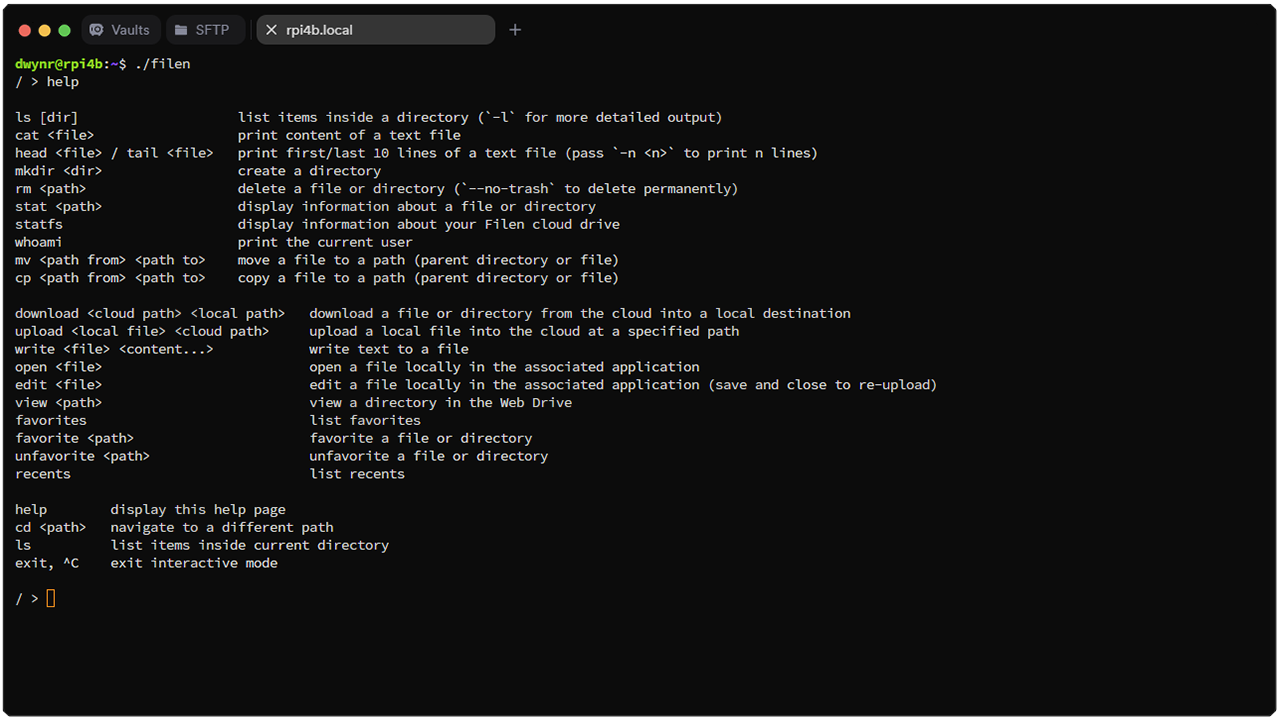
Headless CLI
Manage your cloud using Unix-like commands. Upload, download, and organize files from your terminal for a streamlined, scriptable, GUI-free experience. Perfect for developers and sysadmins.
Third-party integrations
Use the Filen CLI alongside other tools in your stack.
filen export-api-keyPrints your account's API key, used for rclone and other third-party integrations.
$ filen export-api-keyOfficial rclone support
The Filen CLI works alongside rclone, which has had official Filen support since v1.73 (Feb 2026).
See the rclone Filen setup guideFrequently asked Questions
Ready to take back your privacy?
Join us today and experience the power of true data privacy. Secure your files with industry-leading encryption and gain full control over your information. Your privacy is in your hands — get started now!
